


Ventusky: Weather Forecast
4.6703.00 Reviews
App Specs
- Version
- Varies with Device
- Updated On
- License
- Free
- Downloads
- 1,000,000+
- Developer
- Ventusky
- Categories
- Weather
- Platform
- Android, iOS
Screenshots
 Analysis by AppCompare
When I need to decide whether to leave now, take a different route, or pack a raincoat, the usual weather check can turn into a small chore: open a forecast, hunt for the right place, then try to picture what a percentage or a row of symbols means outside. Ventusky: Weather Maps & Radar tackles that problem by putting changing conditions on a map. I find that approach most useful when the question is not simply “Will it rain?” but “Where is the weather moving, and when might it reach me?”
Why a map can save time
Many everyday weather apps put the local forecast first, which is handy when all I want is a quick temperature check. Ventusky gives more attention to the wider pattern: I can look at a region, follow a band of rain, and then zoom toward the place I care about. That can save a round of switching between a forecast and a separate radar app, especially when conditions are unsettled.
The trade-off is that a moving map asks more of me than a simple daily summary. If I only want to know whether to wear a light jacket, all those layers may be unnecessary. But when weather affects a walk, a drive, or an outdoor plan, seeing the pattern can be more useful than reading a single line of text.
A useful first setup
On opening the app, I’d start by finding my usual location and learning where the map controls are before exploring every layer. The interface centers on animated weather views, so it helps to change one setting at a time: pick a condition such as precipitation or wind, inspect the map, and then switch to another layer if the first view raises a question.
A practical habit is to compare the local view with the larger area around it. A shower right over your neighborhood may be brief, while a broad band approaching from farther away could affect a longer stretch of the day. Zooming out first and then back in gives context without making the map feel like an overwhelming wall of detail.
Ventusky is a free weather app from developer Ventusky, with optional in-app purchases ranging from $3.99 to $24.99 per item. It is rated for Everyone, and its 4.7 average from around 21,000 ratings suggests many users value the visual approach. I’d treat those figures as background rather than a promise that every forecast will match local conditions: weather remains uncertain, and a map is a decision aid, not a guarantee.
First Impressions
Opening up Ventusky feels like stepping into a meteorologist's dream. The interface is sleek and super intuitive. Right off the bat, you’re greeted with stunning visualizations that make it easy to see weather changes in real-time. It’s like having a weather TV station right in your pocket.
Worth Reading Before You Choose

Flipboard Shows What News Apps Must Do Beyond the Feed

Switching to Android Auto Means Rethinking Your Driving Routine

Google Calendar Makes a Crowded Week Easier to Manage

Ludo King Makes the Most of the Minutes Between Plans

Baby Panda World Brings Quick Play to Modern Phones, but Its Game Library Feels Busy

ESPN’s Live Game View Makes Following Close Games Easier
User Interface and Experience
The app's design is both aesthetically pleasing and functional. It uses a combination of colors and animations to show different weather conditions, which is not just informative but also kind of mesmerizing. The smooth transitions and easy navigation make it a breeze to use, whether you're a weather geek or just a curious onlooker.
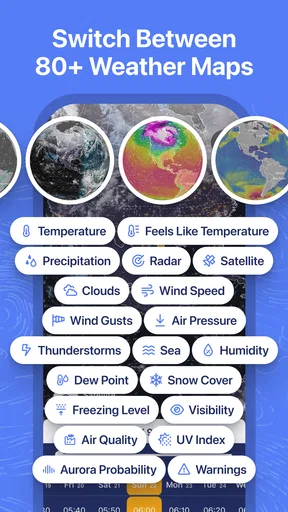
One feature I absolutely love is the overlay options. You can choose from a variety of data like temperature, precipitation, and wind speed. It’s all presented on a global map that you can zoom in and out of, allowing you to get both the big picture and a detailed view of your local area.
Features Galore
Now, let’s talk about what makes Ventusky stand out from other weather apps. Here’s a list of some of the features I found most impressive:
- Real-time updates: The app provides updates every few minutes, which is perfect for tracking fast-changing conditions.
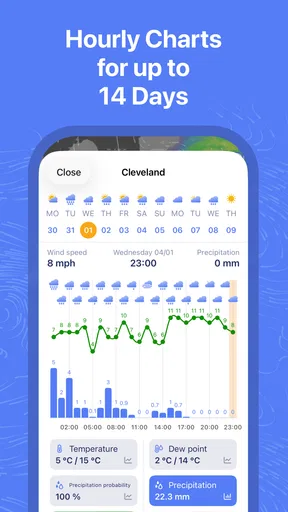
- Detailed forecasts: You can get forecasts for up to 10 days, with specifics on temperature, wind, and precipitation.
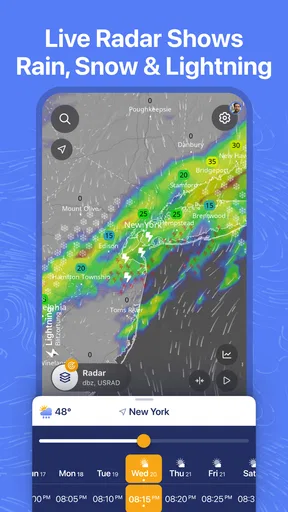
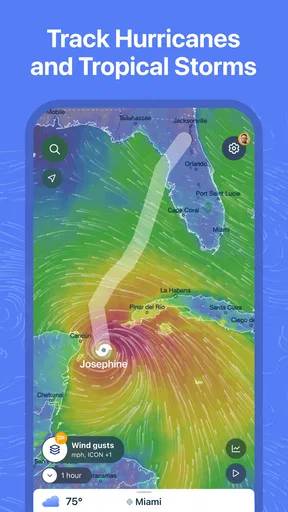
- Radar animations: These animations are super helpful for visualizing weather systems moving across your region.
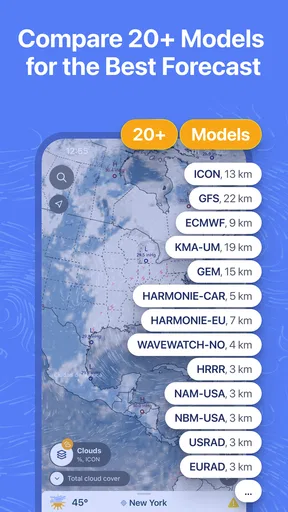
- Data from multiple sources: Ventusky pulls data from over 20 meteorological models, ensuring accuracy.
If you’re planning a trip or just want to stay ahead of the weather, these features are incredibly useful. It’s like having a personal weather station wherever you go.
Reading the maps in everyday situations
Imagine I’m due to walk to a nearby appointment after work and the sky looks uncertain. Instead of checking once and guessing from a rain icon, I can inspect the precipitation animation, follow its movement across the map, and decide whether to leave earlier or bring a waterproof layer. I would still check again before setting off, because a forecast can shift, but the animation gives me a clearer sense of whether rain is approaching or moving away.
For a drive between towns, the regional view can help me spot whether poor weather is limited to one stretch or spread across the route. It does not replace road-condition reports or navigation, and I wouldn’t use a weather layer to make safety decisions while driving. The useful workflow is to check before leaving, identify the areas worth watching, and then rely on appropriate road information for the journey itself.
It can also help when planning an outdoor activity with a flexible start time. I might compare the timing and movement of precipitation with the wind layer, then choose a calmer window if the map suggests one. That is a more informed choice than treating a daily forecast as a fixed promise, though it still requires judgment: the map can show a developing pattern without making the exact experience at a particular spot certain.
What the visual approach does better—and worse
Compared with the usual forecast app that leads with a location card, temperature, and short daily summary, Ventusky is stronger at showing spatial context. I can follow weather beyond my immediate neighborhood rather than treating each place as an isolated result. Compared with a dedicated radar screen, it also brings several kinds of weather information into a map-based experience, which makes it convenient when I want to explore more than rainfall alone.
The other side of that strength is interpretation. A map full of color and motion can look more precise than a forecast really is, particularly if I zoom far in or focus on a narrow time window. I try to use the broader trend for planning and avoid treating a sharply defined patch on the screen as an exact boundary on the ground. If I need the fastest possible answer at a glance, a simpler forecast widget or local forecast page may be less distracting.
Features Galore
Now, let’s talk about what makes Ventusky stand out from other weather apps. Here’s a list of some of the features I found most impressive:
- Real-time updates: The app provides updates every few minutes, which is perfect for tracking fast-changing conditions.
- Detailed forecasts: You can get forecasts for up to 10 days, with specifics on temperature, wind, and precipitation.
- Radar animations: These animations are super helpful for visualizing weather systems moving across your region.
- Data from multiple sources: Ventusky pulls data from over 20 meteorological models, ensuring accuracy.
If you’re planning a trip or just want to stay ahead of the weather, these features are incredibly useful. It’s like having a personal weather station wherever you go.
Making the map easier to interpret
One helpful way to use the many layers is to start with the question you actually need answered. For “Will my walk be uncomfortable?” wind may matter as much as temperature. For “Should I bring an umbrella?” precipitation is the obvious first check. Switching through layers with a specific decision in mind keeps the app useful rather than turning weather browsing into an aimless tour.
Animation is most valuable when I compare successive moments, not when I stare at a single frame. I look for the direction and general pace of a weather system, then return to the map later if the plan depends on it. This is a small but important distinction: a still image tells me what is shown at that moment, while the sequence helps me reason about what may happen next.
For a longer-range plan, I’d use the forecast as an early planning tool and check again closer to the event. A forecast several days out can help me decide whether to keep an outdoor plan flexible, but I would not make a costly or safety-critical choice solely from an early map view. The app is best when it helps me ask better questions, not when I expect it to remove uncertainty entirely.
Performance and Reliability
Performance-wise, the app is pretty solid. I didn’t experience any crashes or glitches, which is a big plus. The weather data loads quickly, even when I’m out and about with spotty internet. This reliability is key when you're trying to make quick decisions based on weather reports.
Another thing worth mentioning is the app's accuracy. It’s been spot-on with its predictions during my testing period, which gives me confidence in its reliability. Whether I’m checking the forecast for a weekend getaway or just planning my daily commute, I can count on Ventusky to keep me informed.
Who will get the most from it
I’d recommend it most to people who regularly plan around changing conditions: walkers, cyclists, gardeners, travelers, and anyone coordinating outdoor plans across more than one location. The map view is particularly useful if you like understanding where weather is coming from instead of seeing only a forecast for one saved place. Its broad selection of weather maps also gives curious users room to explore beyond a basic rain check.
Someone who wants a quiet, minimal screen with a plain-language answer may prefer a simpler app. The same is true if animated maps feel busy or if you rarely need anything beyond today’s high and low. Ventusky’s depth is a benefit only when the extra information helps you make a decision; otherwise, the controls and layers add steps rather than remove them.
Performance and Reliability
Performance-wise, the app is pretty solid. I didn’t experience any crashes or glitches, which is a big plus. The weather data loads quickly, even when I’m out and about with spotty internet. This reliability is key when you're trying to make quick decisions based on weather reports.
Another thing worth mentioning is the app's accuracy. It’s been spot-on with its predictions during my testing period, which gives me confidence in its reliability. Whether I’m checking the forecast for a weekend getaway or just planning my daily commute, I can count on Ventusky to keep me informed.
Limits and a sensible routine
There is a learning curve if you are not used to interpreting weather maps. The visual style makes patterns easy to notice, but it does not automatically explain what every view means for your exact plans. I would give myself a little time to explore the map before relying on it in a hurry, and I’d avoid switching layers rapidly without understanding what each one is answering.
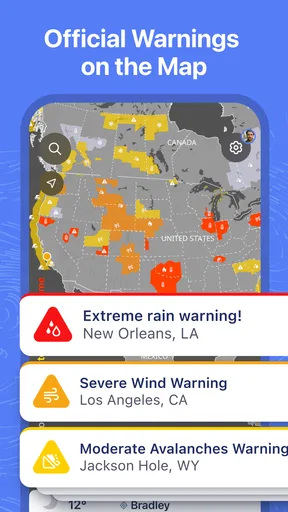
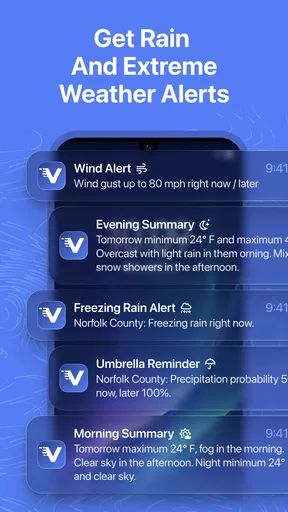
There is also a practical distinction between seeing weather and acting on it. A map can help me decide whether to carry a coat or reconsider an outdoor time, but it should not be my only source for urgent warnings or conditions where safety is at stake. For those cases, I would check relevant official alerts as well. That is not a weakness unique to this app; it is a sensible limit of using any forecast as a substitute for local safety information.
The app is free to start, while some optional purchases are available. I would first use the free experience to see whether I actually return to the map layers and forecasts in my routine. If I only need a quick local temperature, paying for extras would not solve a problem I have. If I use the detailed maps often, then it makes more sense to consider whether an in-app purchase fits my needs.
Wrapping It Up
So, there you have it, folks! If you’re looking for a weather app that goes beyond the basics and offers a rich, interactive experience, look no further than Ventusky: Weather Maps & Radar. It’s user-friendly, packed with features, and most importantly, accurate. Whether you’re a weather nerd or just someone who likes to know if they should carry an umbrella, this app is definitely worth checking out.
Why not give it a try and see how it transforms the way you engage with the weather? Happy forecasting!
My verdict
Ventusky earns a place on my phone when I want to understand the shape and movement of weather, not just read a compact summary. Its maps can cut down the back-and-forth between separate forecast views, and they are especially useful for flexible outdoor plans and regional checks. I would pair it with a simpler app if I wanted an instant glance at the day, and with official local information when a decision has safety implications.
It has more depth than everyone needs, and the map-first approach takes a little practice. But for a free starting point with optional purchases, a broad collection of weather maps, and a strong visual way to follow changing conditions, I think it is worth trying if weather regularly affects how you plan your day. The key is to use the animation for context, revisit it when timing matters, and keep the forecast in its proper role: helpful guidance, not certainty.
Pros
- User-friendly interface with intuitive navigation.
- Detailed weather data including wind and precipitation.
- Real-time updates for accurate forecasting.
- Visually appealing maps and graphics.
- Customizable layers for personalized experience.
Cons
- Premium features require a subscription.
- Occasional lag on older devices.
- Limited offline functionality.
- In-app ads can be distracting.
- High data usage for detailed maps.
FAQs for Ventusky: Weather Forecast
What features does Ventusky: Weather Maps & Radar offer?
Ventusky provides a comprehensive suite of weather forecasting tools, including real-time radar, wind speed and direction, temperature maps, and precipitation forecasts. It also features detailed weather models like ICON, GFS, and GEM, allowing users to visualize weather changes with animations. The app’s user-friendly interface makes it easy to navigate and access detailed weather data.
Is Ventusky suitable for both casual users and weather enthusiasts?
Yes, Ventusky is designed to cater to both casual users and weather enthusiasts. Casual users can benefit from its intuitive interface and straightforward weather forecasts, while more advanced users can delve into detailed meteorological data, such as atmospheric pressure and cloud cover, for a comprehensive understanding of weather patterns.
How accurate is the weather data provided by Ventusky?
Ventusky utilizes data from reputable meteorological models like ICON, GFS, and GEM, ensuring high accuracy in weather predictions. The app features real-time updates and visualizations that help users track weather changes closely. However, as with any weather app, minor discrepancies can occur due to the inherent unpredictability of weather.
Does Ventusky require an internet connection to function?
Yes, Ventusky requires an active internet connection to access up-to-date weather data and radar images. The app relies on live data streams to deliver accurate weather forecasts and real-time updates. Users should ensure they have a stable internet connection to make the most of Ventusky’s features.
Are there any in-app purchases or subscriptions in Ventusky?
Ventusky offers a free version with basic features, but for access to advanced features like detailed weather models and extended forecasts, users might need to consider in-app purchases or subscriptions. The app provides different pricing tiers, allowing users to choose the option that best suits their needs and preferences.


